
Third-party cookies are disappearing, but conversions aren’t. The challenge is measuring them without the tracking infrastructure marketers relied on for two decades. Fortunately, cookieless conversion tracking isn’t just possible — it’s often more accurate than what cookies delivered. Here’s how to set it up.
Why Cookie-Based Conversion Tracking Is Broken
Cookie-based tracking worked well in 2015. It doesn’t in 2026. Three forces have gutted its reliability:
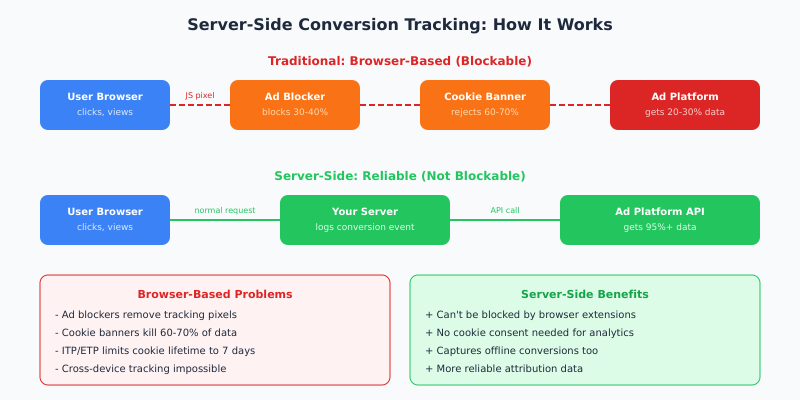
- Browser privacy features — Safari’s ITP limits first-party cookies to 7 days. Firefox blocks third-party cookies entirely. Chrome is phasing them out.
- Ad blockers — Over 30% of desktop users run ad blockers that strip tracking pixels before they fire. Consequently, your conversion data has a hole you can’t see.
- Cookie consent banners — In Europe, 60-70% of visitors reject or ignore cookie consent prompts. Therefore, GA4 only sees a fraction of your actual conversions.
The result? If you’re relying solely on browser-based tracking, you’re likely measuring 20-40% of your actual conversions. That’s not a rounding error. It’s a blind spot that corrupts every decision you make — from ad spend allocation to content strategy.
For more on what this means for search traffic specifically, see our guide on SEO analytics in a cookieless world.
5 Methods for Cookieless Conversion Tracking
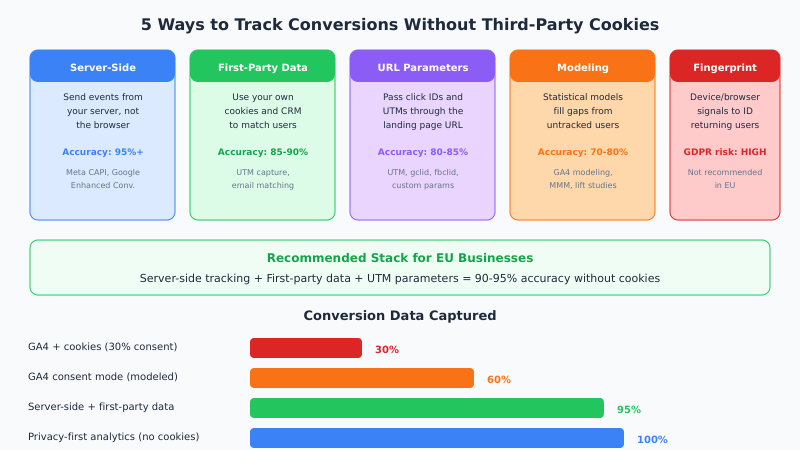
Not all cookieless methods are equal. Some are more accurate, some are simpler, and some carry privacy risks. Here’s how they compare:
Server-Side Tracking: The Foundation
Server-side tracking is the single most impactful upgrade you can make. Instead of relying on JavaScript in the user’s browser — which ad blockers remove and cookie banners throttle — you send conversion events directly from your server.
How It Works
- A visitor clicks your ad and lands on your site. Your server logs the click ID from the URL.
- The visitor browses, adds to cart, and completes a purchase. Your backend records the conversion.
- Your server sends the conversion event to the ad platform’s API — Meta’s Conversions API, Google’s Enhanced Conversions, or similar.
- The ad platform matches the conversion to the original click. No browser involvement needed.
This approach captures conversions that browser-based tracking misses entirely — including users with ad blockers, those who rejected cookies, and cross-device conversions.
Which Platforms Support Server-Side Tracking?
| Platform | API Name | What It Does |
|---|---|---|
| Meta (Facebook) | Conversions API (CAPI) | Sends purchase, lead, and custom events server-to-server |
| Google Ads | Enhanced Conversions | Matches conversions using hashed first-party data |
| TikTok | Events API | Server-side event tracking for TikTok ad attribution |
| Conversions API | B2B lead and conversion tracking via server events | |
| Conversions API | Server-side purchase and engagement tracking |
First-Party Data: Your Secret Weapon
First-party data is information you collect directly from your visitors — email addresses, form submissions, purchase records, CRM entries. Unlike third-party cookies, this data is yours, it’s accurate, and GDPR doesn’t restrict its use for your own analytics (provided you have a lawful basis).
Building a First-Party Data Strategy
- Capture UTM parameters on arrival. When a visitor lands on your site, grab the
utm_source,utm_medium,utm_campaign, and any click IDs (gclid,fbclid) from the URL. Store them in a first-party cookie orlocalStorage. - Pass the data to your CRM. When the visitor fills out a form or makes a purchase, attach the stored marketing source data to their record.
- Match conversions to campaigns. Your CRM now contains both the conversion event and the original traffic source — no third-party cookies needed.
In other words, you’re building your own attribution system using data you already collect. The accuracy is typically 85-90% — far better than cookie-based tracking with consent banners.
For detailed guidance on setting up data export workflows, check our guide on automation and data export in privacy-first analytics.

UTM Parameters: Simple but Effective
UTM parameters are the oldest trick in the book, and they still work. Moreover, they work without any cookies at all.
Every link to your site from an ad, email, or social post should include UTM tags:
https://yoursite.com/pricing?utm_source=facebook&utm_medium=cpc&utm_campaign=spring-sale
When the visitor converts, you know exactly which campaign drove them. However, UTMs have limitations:
- They only track the last click (no multi-touch attribution)
- Users can share tagged URLs, polluting your data
- They require discipline — every link must be tagged consistently
That said, UTMs combined with server-side tracking and first-party data create a robust attribution system that covers 90-95% of conversions.
Statistical Modeling: Filling the Gaps
Even the best cookieless setup won’t capture 100% of conversions deterministically. Statistical modeling fills the remaining gap.
GA4’s Consent Mode uses machine learning to estimate conversions from users who declined cookies. It analyzes patterns from consented users and extrapolates to the full audience. Specifically, it models:
- Conversion probability based on traffic patterns
- Geographic and device-based conversion rates
- Time-of-day and campaign-level patterns
More sophisticated approaches include Marketing Mix Modeling (MMM) — which uses aggregate spend and revenue data to measure channel effectiveness without any user-level tracking — and incrementality testing, which runs controlled experiments to prove causation.
Statistical modeling works best as a complement to deterministic tracking, not a replacement. Use server-side tracking for 95% of your data, then model the remaining 5%.
What About Fingerprinting?
Browser fingerprinting identifies users by combining device signals — screen resolution, installed fonts, browser version, timezone. It works without cookies. However, it’s effectively illegal under GDPR.
The European Data Protection Board has classified fingerprinting as a form of tracking that requires consent. Furthermore, it’s less accurate than it sounds — shared devices, VPNs, and browser updates constantly change the fingerprint. Avoid it.
For more on GDPR implications, see our GDPR-compliant analytics guide.
The Recommended Stack for EU Businesses
Based on privacy compliance, accuracy, and implementation effort, here’s the optimal cookieless conversion tracking setup:
| Layer | Tool/Method | Purpose |
|---|---|---|
| Analytics | Plausible, Fathom, or Matomo | 100% traffic visibility, no cookies needed |
| Ad attribution | Platform Conversion APIs | Server-side conversion events for ad platforms |
| CRM integration | UTM capture + CRM matching | First-party attribution for leads and sales |
| Gap filling | MMM or incrementality tests | Measure what deterministic tracking can’t |
This stack gives you 95%+ conversion visibility while remaining fully GDPR compliant. Consequently, you won’t need cookie banners for analytics, you won’t lose data to ad blockers, and you’ll actually have more accurate data than cookie-based tracking ever provided.
If you’re considering the switch, our analytics migration checklist walks you through the process step by step. And for context on what you gain and lose, read what changes when you leave Google Analytics.
Bottom Line
Cookieless conversion tracking isn’t a compromise — it’s an upgrade. Server-side tracking captures conversions that browser pixels miss. First-party data gives you attribution that cookies never could. And privacy-first analytics tools show you 100% of your traffic instead of the 30% that consented to cookies.
The businesses that adapt now will have better data, lower compliance risk, and a clearer picture of what’s actually driving their growth. The ones that wait will keep optimizing on 30% of their data and wondering why their numbers don’t add up.