

Pageviews alone tell you almost nothing about what visitors actually do on your site. They clicked a page — but did they read it? Did they click the CTA? Did they download the PDF? Event tracking answers these questions. However, most event tracking guides assume you’re using Google Analytics with full cookie access. That’s no longer realistic for privacy-conscious businesses.
This guide explains event tracking analytics from the ground up, then shows you how to implement it using cookieless, privacy-first tools.
What Is Event Tracking?
Event tracking captures specific user interactions on your website beyond simple page loads. Every button click, form submission, video play, or file download can be recorded as a discrete event with properties that describe the action.
In GA4, everything is an event — even pageviews. Privacy-first tools like Plausible and Fathom take a simpler approach: pageviews are tracked automatically, and you define custom events for the specific interactions that matter to your business.
A typical event contains three elements:
- Event name: What happened (e.g.,
signup_click,pdf_download,video_play) - Event properties: Additional context (e.g., button location, file name, video title)
- Timestamp: When the event occurred
Moreover, events are the foundation of conversion tracking. Without them, you’re measuring traffic volume but not traffic quality.
Types of Events You Should Track
Not every interaction deserves an event. Focus on actions that directly relate to your business goals. Here’s a framework for categorizing events:
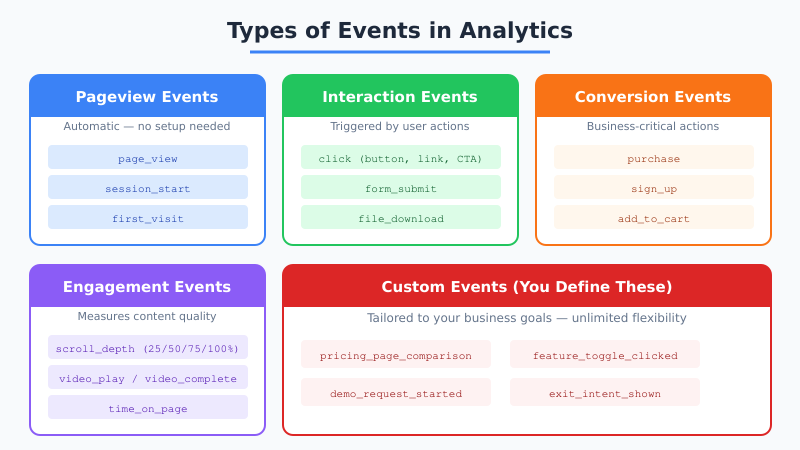
High-Priority Events (Track These First)
| Event | What It Measures | Why It Matters |
|---|---|---|
| Form submissions | Lead generation completions | Direct revenue indicator |
| CTA button clicks | Engagement with key actions | Conversion funnel health |
| Purchases/signups | Revenue-generating actions | Bottom-line business metric |
| File downloads | Content engagement depth | Lead magnet effectiveness |
Medium-Priority Events
| Event | What It Measures | Why It Matters |
|---|---|---|
| Scroll depth | How far visitors read content | Content quality signal |
| Outbound link clicks | Where visitors go after your site | Referral and partnership insights |
| Video engagement | Play, pause, completion rates | Media content ROI |
| Search queries | What visitors look for on-site | Content gap identification |
Therefore, start with high-priority events that directly tie to revenue. You can always add more granular tracking later.
Event Tracking in GA4 vs. Privacy-First Tools
The implementation approach differs significantly between GA4 and privacy-first analytics platforms. Understanding these differences helps you choose the right tool — or plan a migration.

GA4 Event Tracking
GA4 uses an event-based data model where every data point is an event. It provides three categories:
- Automatically collected events: page_view, session_start, first_visit — tracked without any code changes.
- Enhanced measurement events: scroll, outbound click, file download, video engagement — toggled on in the GA4 interface.
- Custom events: Anything specific to your business that you define and implement via gtag.js or Google Tag Manager.
The problem? GA4 requires cookies, which means you need a consent banner. Visitors who reject cookies — often 30-50% in the EU — generate zero event data. Consequently, your event reports only reflect a subset of actual behavior.
Privacy-First Event Tracking (Plausible, Fathom, Simple Analytics)
These tools take a deliberately simpler approach:
- Pageviews: Tracked automatically, no cookies required.
- Custom events: You define them with a simple JavaScript call or CSS class.
- Goals: Events can be promoted to “goals” that appear prominently on your dashboard.
There’s no tag manager, no consent banner, and no complex configuration hierarchy. In other words, you trade some of GA4’s flexibility for dramatically simpler implementation and 100% visitor coverage.
Implementing Event Tracking in Plausible
Plausible is one of the most popular privacy-first analytics tools, and its event tracking is refreshingly straightforward. Here’s how to set it up:
Step 1: Enable Custom Events
Replace the standard Plausible script with the extended version that supports custom events:
<script defer data-domain="yoursite.com"
  src="https://plausible.io/js/script.js"></script>
Step 2: Add Event Calls
Use the plausible() function to fire events:
// Track a button click
document.getElementById('signup-btn').addEventListener('click', function() {
  plausible('Signup Click', {props: {location: 'header'}});
});

// Track a form submission
document.getElementById('contact-form').addEventListener('submit', function() {
  plausible('Contact Form Submit');
});
Step 3: Define Goals in Plausible Dashboard
Go to Site Settings, then Goals, and add each event name. Plausible will start showing conversion data immediately.
Furthermore, Plausible supports CSS-class-based triggers. Add class="plausible-event-name=Signup+Click" to any HTML element, and clicks will automatically fire that event — no JavaScript required.
Implementing Event Tracking in Fathom
Fathom offers a similarly simple approach with its Events feature:
// Track an event with Fathom
fathom.trackEvent('Signup Click', { _value: 100 });

// The _value property lets you assign monetary value
fathom.trackEvent('Purchase Complete', { _value: 4999 });
Fathom’s event tracking also works without cookies. However, it adds a unique feature: monetary value assignment. You can attach a cent value to each event, making it easy to calculate the revenue impact of specific actions.

Event Tracking Best Practices for Privacy-First Analytics
Regardless of which tool you use, these principles improve event tracking quality:
Naming Conventions
- Use descriptive names:
pricing_cta_clickbeatsclick1. - Establish a naming pattern: Use
object_actionformat consistently (e.g.,form_submit,video_play,file_download). - Keep it readable: Your future self and teammates need to understand what each event measures.
- Use lowercase with underscores: Avoids case-sensitivity issues across platforms.
What NOT to Track
- Every single click. Tracking everything creates noise that drowns out meaningful signals.
- Personal identifiers. Never include email addresses, names, or user IDs in event properties. This violates GDPR requirements even with cookieless tools.
- Events without a business purpose. If you can’t explain how an event informs a decision, don’t track it.
Building a Conversion Funnel with Events
Individual events become powerful when you chain them into a conversion funnel. Here’s how to structure one:
- Awareness event: Landing page view (automatic pageview tracking)
- Interest event: Scroll depth past 50%, or pricing page visit
- Consideration event: CTA click, demo request start, comparison table interaction
- Conversion event: Form submission, purchase, signup completion
By measuring the drop-off between each stage, you identify exactly where visitors lose interest. For example, if 80% of visitors reach the pricing page but only 5% click the CTA, the pricing page needs work — not the checkout flow.
This approach works seamlessly with cookieless tools because each event is independent. You don’t need cookies to connect funnel stages when you’re analyzing aggregate conversion rates. For more on calculating and improving these rates, see our guide on website conversion rate optimization.
Server-Side Event Tracking
Client-side event tracking (JavaScript in the browser) misses events blocked by ad blockers or JavaScript errors. Server-side event tracking captures interactions on your backend instead.
Common server-side events include:
- API calls: Track when users interact with your backend services.
- Form processing: Record form submissions when the server processes them, not when JavaScript fires.
- Payment completions: Capture purchase events from your payment processor’s webhook, guaranteeing 100% accuracy.
- Email events: Track sends, deliveries, and bounces from your email service.
Moreover, server-side tracking pairs well with privacy-first analytics. Tools like Plausible offer a server-side events API that accepts events via HTTP requests — no browser JavaScript needed. Learn more about this approach in our guide on server-side analytics setup.
Migrating Event Tracking from GA4 to Privacy-First Tools
If you’re currently using GA4 events and want to switch, here’s a migration plan:
| Step | Action | Details |
|---|---|---|
| 1 | Audit existing events | Export your GA4 event list and identify which ones you actually use in reports |
| 2 | Map to new tool | Match each GA4 event to its equivalent in your privacy-first tool |
| 3 | Prioritize conversions | Migrate revenue-critical events first (purchases, signups, lead forms) |
| 4 | Run parallel tracking | Keep GA4 and new tool running simultaneously for 2-4 weeks |
| 5 | Validate data | Compare event counts between tools to ensure nothing is missing |
| 6 | Remove GA4 | Once validated, remove the GA4 script and cookie consent banner |
Consequently, the migration typically takes 2-4 weeks. The biggest time investment is auditing your existing events — most teams discover they only actively use 10-20% of what they track. For a complete migration framework, review the analytics migration checklist.

Advanced: Event Tracking with Custom Properties
Custom properties add context to events, turning simple action counts into rich behavioral data. Here are practical examples:
// Plausible: Track signup with plan type
plausible('Signup Complete', {
  props: {
    plan: 'professional',
    billing: 'annual',
    source: 'pricing_page'
  }
});

// Fathom: Track download with file details
fathom.trackEvent('PDF Download', { _value: 0 });
// Note: Fathom uses separate event names per property value
However, there’s an important privacy consideration. Never include personally identifiable information (PII) in event properties. Use category labels like “enterprise_plan” instead of company names, and “referral_partner_a” instead of actual partner URLs that could identify individuals.
Measuring Event Tracking ROI
Event tracking isn’t free — it takes development time and ongoing maintenance. Here’s how to measure whether your tracking setup delivers value:
- Decision frequency: How often do you use event data to make decisions? If you never check scroll depth data, stop tracking it.
- Conversion optimization: Have event insights led to measurable conversion rate improvements?
- Data accuracy: Are your event counts reliable? Compare server-side records with analytics data.
- Team adoption: Does your team actually look at event reports? Data nobody reads has zero value.
Therefore, review your event tracking setup quarterly. Remove events nobody uses, add new ones that support current business questions, and verify that data flows correctly. The goal isn’t maximum tracking — it’s maximum insight per event.
Event tracking in cookieless analytics is simpler to implement, covers 100% of visitors, and still gives you the behavioral insights you need. Start with 5-10 high-priority events, validate they’re firing correctly, and expand from there.