

Most marketing teams still default to Google Analytics for their dashboards. However, building a marketing dashboard without Google Analytics isn’t just possible in 2026 — it’s often the smarter choice. Privacy regulations, cookie consent requirements, and inaccurate data from ad blockers have made GA4 dashboards unreliable for many organizations.
A well-built marketing dashboard without Google Analytics gives you cleaner data, simpler workflows, and full GDPR compliance. Moreover, you won’t need to wrestle with GA4’s notoriously complex interface just to answer basic questions about your traffic.

Why Marketers Are Abandoning Google Analytics Dashboards
The shift away from Google Analytics dashboards isn’t just about privacy — though that’s a major driver. Consequently, teams across Europe and beyond are discovering that GDPR compliance concerns are only the beginning of the problem.
Here’s what’s pushing marketers toward alternatives:
- Data sampling: GA4 samples data on high-traffic sites, meaning your dashboard shows estimates rather than actual numbers
- Cookie consent gaps: Users who decline cookies disappear from your reports entirely, creating blind spots of 30-60% in some European markets
- Interface complexity: GA4’s exploration reports require significant training, and many marketers never use them correctly
- Data ownership: Your analytics data lives on Google’s servers, subject to their retention policies and terms
- Ad blocker impact: Up to 40% of tech-savvy audiences block Google Analytics scripts completely
Therefore, the real question isn’t whether you can build a dashboard without GA — it’s why you’d still choose not to.
Essential Metrics for Your Marketing Dashboard
Before choosing tools, you need to decide what actually belongs on your dashboard. The biggest mistake marketers make is tracking everything instead of tracking what matters. In other words, a dashboard with 50 metrics is a spreadsheet, not a decision-making tool.
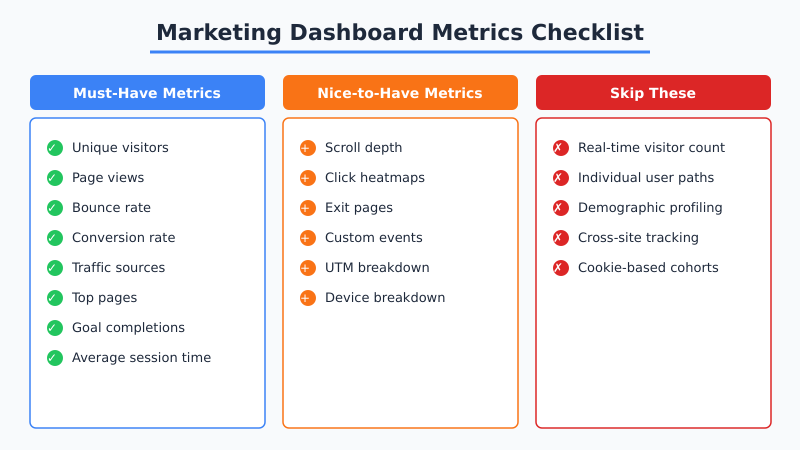
Focus on metrics that directly tie to business outcomes. Furthermore, every metric on your dashboard should answer a specific question that drives action.
| Metric Category | Key Metrics | Business Question Answered |
|---|---|---|
| Acquisition | Unique visitors, traffic sources, referrers | Where are visitors coming from? |
| Engagement | Page views, bounce rate, time on page | Is our content resonating? |
| Conversion | Goal completions, conversion rate | Are visitors taking desired actions? |
| Content | Top pages, entry pages, exit pages | Which content performs best? |
| Campaigns | UTM performance, referral traffic | Which campaigns drive results? |
“The best marketing dashboard is one where every single metric triggers a specific action. If you can’t act on it, remove it.” — This principle separates useful dashboards from data graveyards.
Top Privacy-First Dashboard Tools Compared
Several excellent tools now provide everything marketers need without the privacy baggage. Additionally, most of these tools are significantly easier to set up and use than GA4.
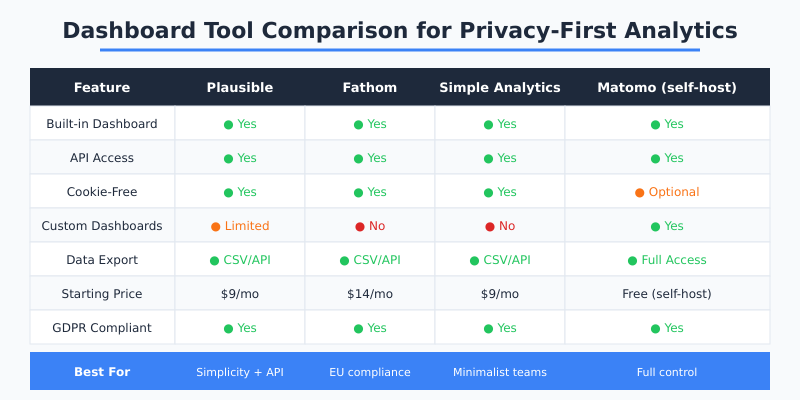
Plausible Analytics
Plausible offers the cleanest single-page dashboard in the privacy analytics space. It’s cookie-free by default, weighs under 1KB, and provides an API for custom dashboard builds. Consequently, it’s become the go-to choice for teams that want simplicity without sacrificing essential data.
Key advantages for dashboards:
- One-page dashboard that loads instantly
- Built-in UTM tracking and goal conversions
- API access for pulling data into external tools
- Shared dashboard links (no login required for stakeholders)
Fathom Analytics
Fathom is another strong contender, particularly for teams focused on EU compliance. It processes data through EU-isolated infrastructure and provides a straightforward dashboard experience. However, its customization options are more limited than Matomo’s.
Matomo (Self-Hosted)
For teams that need maximum flexibility, self-hosted Matomo provides the most GA-like experience while keeping data on your own servers. Therefore, it’s the best option for organizations that need custom dashboards with complex widget configurations.
Step-by-Step: Building Your Dashboard
Here’s a practical workflow for creating a marketing dashboard without Google Analytics. This process works regardless of which privacy-first tool you choose.

Step 1: Define Your Dashboard Goals
Start by listing the three to five questions your dashboard must answer weekly. For most marketing teams, these include:
- Is traffic growing or declining?
- Which channels drive the most conversions?
- What content resonates with our audience?
- Are our campaigns performing against targets?
- Where do visitors drop off in our funnel?
Step 2: Set Up Your Analytics Tool
Install your chosen privacy-first analytics tool. Most require just a single script tag — no cookie consent banner needed for cookieless options. As a result, you’ll start collecting accurate data from day one, without the 30-60% data loss caused by consent rejection.
If you’re migrating from GA4, follow our analytics migration checklist to ensure a smooth transition.
Step 3: Configure Goals and Events
Set up event tracking for your key conversion actions. In Plausible, for instance, this means defining custom events for form submissions, button clicks, or file downloads. Similarly, Fathom and Simple Analytics support custom event definitions through their dashboards.
Step 4: Add UTM Tracking to Campaigns
Privacy-first tools support standard UTM parameters. Therefore, your existing UTM tracking setup carries over directly. Tag all campaigns with utm_source, utm_medium, and utm_campaign parameters to see channel performance in your dashboard.
Step 5: Build External Dashboards (Optional)
If your team needs a combined view with data from multiple sources, use the API to pull analytics data into tools like:
- Google Sheets / Excel: Simple and accessible for small teams
- Grafana: Open-source dashboarding with advanced visualization
- Geckoboard: Purpose-built for marketing team TV dashboards
- Klipfolio: Cloud-based with pre-built privacy tool integrations
Combining Multiple Data Sources
A marketing dashboard without Google Analytics doesn’t mean a dashboard with only one data source. In fact, the best dashboards combine web analytics with other marketing data. Moreover, privacy-first tools make this easier through clean API access and data export capabilities.
Here’s a practical multi-source dashboard setup:
| Data Source | Metrics Pulled | Integration Method |
|---|---|---|
| Plausible / Fathom | Traffic, conversions, top pages | API or CSV export |
| Email platform | Open rates, click rates, subscribers | API integration |
| Search Console | Keywords, impressions, CTR | Google API (privacy-safe) |
| CRM | Leads, revenue, customer value | API or webhook |
| Social media | Engagement, referral traffic | Platform APIs |
Google Search Console data is privacy-safe because it tracks your site’s search performance, not individual user behavior. Consequently, you can combine it with cookieless analytics without introducing any privacy concerns.
Common Mistakes to Avoid
After helping dozens of teams build privacy-first dashboards, these are the mistakes that come up most frequently:
- Overloading the dashboard: More metrics doesn’t mean more insight. Stick to 8-12 key metrics maximum.
- Ignoring mobile views: Ensure your dashboard works on phones for quick checks.
- Not setting baselines: Track at least 30 days of data before drawing conclusions about trends.
- Forgetting campaign tagging: Without consistent UTMs, your traffic source data becomes meaningless.
- Comparing GA4 numbers directly: Privacy-first tools count differently. Therefore, don’t expect identical numbers — expect more accurate ones.
Tip: Share your dashboard with stakeholders using public links (available in Plausible and Fathom). This eliminates the “can you send me the latest numbers” requests and keeps everyone aligned on the same data.
What You’ll Gain by Switching
Teams that build a marketing dashboard without Google Analytics consistently report several improvements. First, data accuracy increases because cookieless tools aren’t blocked by ad blockers or limited by consent rejection. Second, dashboard loading times drop dramatically — Plausible’s dashboard loads in under a second compared to GA4’s frequent delays.
Additionally, you’ll find that leaving Google Analytics simplifies your entire marketing stack. No more Tag Manager configurations, no more consent mode debugging, and no more explaining to stakeholders why the numbers don’t add up.
The transition takes most teams one to two weeks. However, the time savings in reporting alone typically pay for a privacy-first analytics subscription within the first month. Start with your most important metrics, build a clean dashboard, and expand from there.