

Content marketing works. However, proving it works — with actual numbers — remains one of the hardest challenges in marketing. The traditional approach relied on Google Analytics multi-touch attribution, which depended on cookies that browsers now block and users actively refuse. Consequently, marketers need a new playbook for measuring content marketing ROI analytics.
The good news: you can measure content ROI more accurately without Google Analytics than with it. Privacy-first tools eliminate the data gaps caused by ad blockers and consent rejection, giving you a clearer picture of what your content actually delivers.

The Content Marketing ROI Formula
Before diving into tools and methods, you need to understand the core formula. Content marketing ROI analytics starts with a simple equation:
ROI = (Revenue from Content – Content Cost) / Content Cost x 100
For example, if your blog generates $10,000 in attributed revenue and costs $3,000 to produce, your ROI is 233%. In other words, every dollar spent on content returns $2.33.
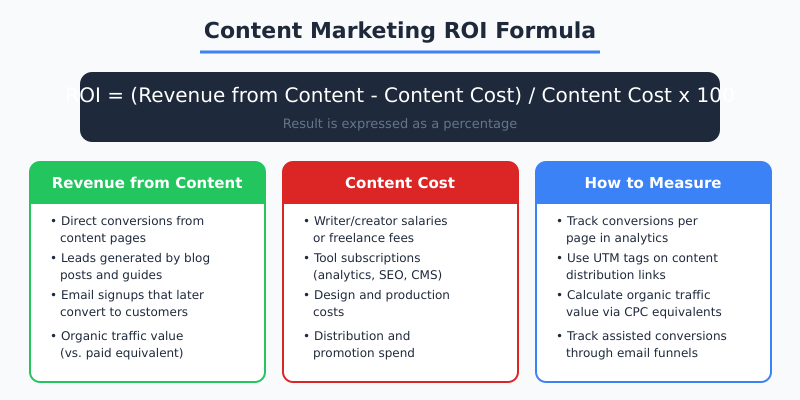
The challenge isn’t the formula — it’s accurately measuring both sides of the equation. Therefore, let’s break down exactly how to calculate each component without relying on Google Analytics.
Measuring Revenue from Content
Revenue attribution is where most content marketers get stuck. However, privacy-first analytics tools actually make this easier in several ways.
Direct Conversion Tracking
Set up event tracking on every conversion action that happens on content pages. This includes:
- Form submissions from blog posts
- Product purchases originating from content pages
- Demo or trial signups from landing pages
- Email newsletter subscriptions from article CTAs
- File downloads (whitepapers, guides, templates)
Privacy-first tools like Plausible and Fathom track these conversions without cookies. As a result, you capture conversions from visitors who would be invisible in GA4 due to consent rejection or ad blockers.
Organic Traffic Value
One of the most powerful ways to quantify content value is calculating its organic traffic equivalent. Here’s how:
- Check Google Search Console for total organic clicks to your content pages
- Identify the primary keyword for each page
- Look up the cost-per-click (CPC) for those keywords
- Multiply: organic clicks x CPC = organic traffic value
If your blog post ranks for “analytics migration guide” (CPC: $4.50) and receives 500 organic clicks per month, that single page generates $2,250/month in equivalent paid traffic value. Moreover, this value compounds — unlike paid ads, content keeps delivering traffic after you stop investing.
| Revenue Source | How to Measure | Tools Needed |
|---|---|---|
| Direct conversions | Event tracking on content pages | Plausible, Fathom, or Simple Analytics |
| Organic traffic value | Organic clicks x keyword CPC | Search Console + keyword tool |
| Email-assisted conversions | UTM-tagged links in content-driven emails | Email platform + analytics |
| Lead generation | Form submissions per content page | Analytics event tracking |
| Brand search lift | Branded search volume over time | Search Console |
“Content marketing ROI isn’t just about direct conversions. A blog post that ranks #1 for a high-CPC keyword delivers measurable value every single month — even if no one clicks a CTA on that page.”
Calculating Content Costs Accurately
Most teams undercount their content costs, which inflates ROI numbers. Therefore, include every cost in your calculation:
- Creation costs: Writer salaries, freelancer fees, editor time
- Design costs: Graphics, images, video production
- Tool costs: SEO tools, analytics subscriptions, CMS hosting
- Distribution costs: Email platform fees, social media management tools
- Promotion costs: Any paid promotion of content (social ads, sponsored placements)
- Management overhead: Content strategy, editorial calendar management, reporting time
For a realistic cost estimate, track time spent on each piece of content and multiply by the hourly rate of each team member involved. Consequently, you’ll get an honest cost-per-article figure that makes your ROI calculations trustworthy.
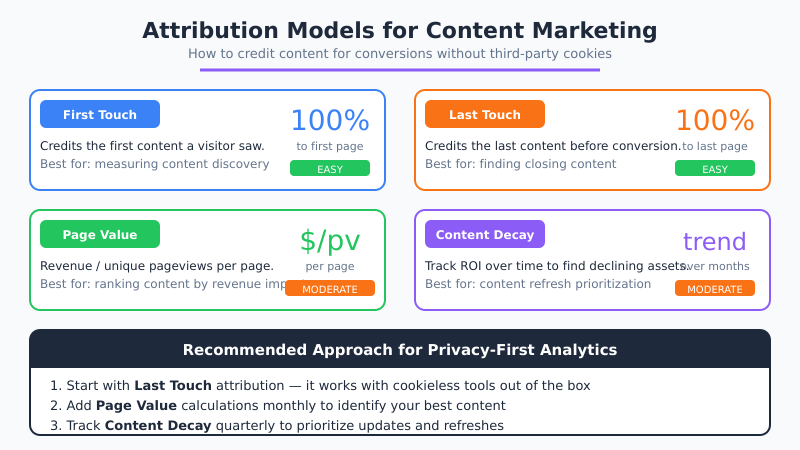
Attribution Models That Work Without Cookies
Traditional multi-touch attribution required cookies to follow users across multiple sessions. Since cookieless tracking can’t do that by design, you need different attribution approaches.
Last-Touch Attribution
The simplest model: credit the last content page a visitor viewed before converting. This works natively with every privacy-first analytics tool. However, it undervalues top-of-funnel content that introduces visitors to your brand.
First-Touch Attribution
Credit the first page that brought a visitor to your site. This is available through landing page reports in most analytics tools. Nevertheless, it overvalues discovery content and undervalues content that closes deals.
Page Value Method
This is the most practical approach for content marketing ROI analytics without cookies:
- Calculate total revenue for a period
- Identify all pages that appeared in converting sessions
- Divide revenue by total unique pageviews across those pages
- Assign each page a value based on its share of pageviews
The page value method doesn’t require cross-session tracking. Therefore, it works perfectly with cookieless analytics tools. Additionally, it gives you a clear ranking of which content pages contribute most to revenue.

Building a Content ROI Dashboard
Combine your privacy-first analytics data into a monthly content ROI report. Here’s a template:
| Metric | This Month | Last Month | Trend |
|---|---|---|---|
| Total content pages published | [number] | [number] | [up/down] |
| Organic traffic to content | [number] | [number] | [up/down] |
| Conversions from content pages | [number] | [number] | [up/down] |
| Organic traffic value (CPC equiv.) | [dollar amount] | [dollar amount] | [up/down] |
| Total content investment | [dollar amount] | [dollar amount] | [up/down] |
| Content ROI % | [percentage] | [percentage] | [up/down] |
Use data export features from your analytics tool to automate parts of this report. Most privacy-first tools offer CSV exports and API access that feed directly into spreadsheets.
Tracking Content Performance by Type
Not all content types deliver the same ROI. Therefore, segment your analysis by content category to find where investment pays off most.
| Content Type | Typical ROI Timeline | Best Metric | Privacy-Friendly Tracking |
|---|---|---|---|
| Blog posts (SEO) | 3-6 months | Organic traffic value | Search Console + analytics |
| Landing pages | Immediate | Conversion rate | Event tracking |
| Email newsletters | 1-4 weeks | Click-through revenue | UTM tracking |
| Case studies | 1-3 months | Lead generation | Form submission events |
| Guides/whitepapers | 1-6 months | Downloads + leads | Download event tracking |
SEO-focused blog content typically delivers the highest long-term ROI because it compounds. A post published today continues generating organic traffic — and revenue — for months or years. Consequently, measuring organic traffic accurately is crucial for content ROI.
Using UTMs to Track Content Distribution
When you distribute content across channels, UTM parameters become your primary attribution mechanism. Tag every link with:
- utm_source: Where the link appears (newsletter, twitter, linkedin)
- utm_medium: The channel type (email, social, referral)
- utm_campaign: The specific campaign or content piece
- utm_content: The specific link or CTA variant (for A/B testing)
Privacy-first analytics tools display UTM data in their dashboards without cookies. As a result, you can track exactly which distribution channel drives the most conversions for each piece of content.
Pro tip: Create a UTM naming convention document and share it with your entire team. Inconsistent UTM tags are the most common reason content distribution data becomes useless.
Common Content ROI Mistakes
Even with the right tools, teams frequently miscalculate content marketing ROI. Avoid these errors:
- Measuring too early: SEO content needs 3-6 months to reach full potential. Therefore, don’t judge blog post ROI after two weeks.
- Ignoring compounding: Evergreen content generates traffic for years. Annual ROI calculations capture this better than monthly ones.
- Counting only direct conversions: Content that builds brand awareness doesn’t always generate immediate conversions. However, it increases branded search volume, which you can track in Search Console.
- Not accounting for content refresh: Updating old content is often cheaper and more effective than creating new content. Track refresh ROI separately.
- Comparing to paid ads unfairly: Paid ads stop working when you stop paying. Content keeps working. Moreover, comparing monthly content ROI to paid ad ROI ignores this fundamental difference.
Start Measuring Content ROI This Week
You don’t need a complex analytics setup to start measuring content marketing ROI. Begin with these three steps:
- Set up conversion tracking on your top 10 content pages using your privacy-first analytics tool
- Calculate organic traffic value for your top-ranking pages using Search Console data and CPC estimates
- Track content costs in a simple spreadsheet — time, tools, and promotion spend per piece
With those three inputs, you can calculate a meaningful content ROI figure within your first month. Furthermore, you’ll be measuring it more accurately than most teams using Google Analytics, because your data won’t have the blind spots created by ad blockers and consent rejection. The path to proving content’s value starts with migrating to privacy-first analytics — and the ROI data will follow.