
The riskiest moment in any analytics migration is the switch itself. Turn off the old tool, turn on the new one, and you’re trusting numbers you’ve never seen before. Parallel tracking removes that risk. You run both tools at the same time for a few weeks, compare their numbers, and only retire the old one once you trust the new one. Here’s how to run two analytics tools in parallel during a migration without slowing your site or double-counting traffic.
Every clean migration I’ve run used a parallel period. It’s the difference between “the numbers look right” and “I hope the numbers are right.”
What Parallel Tracking Actually Means
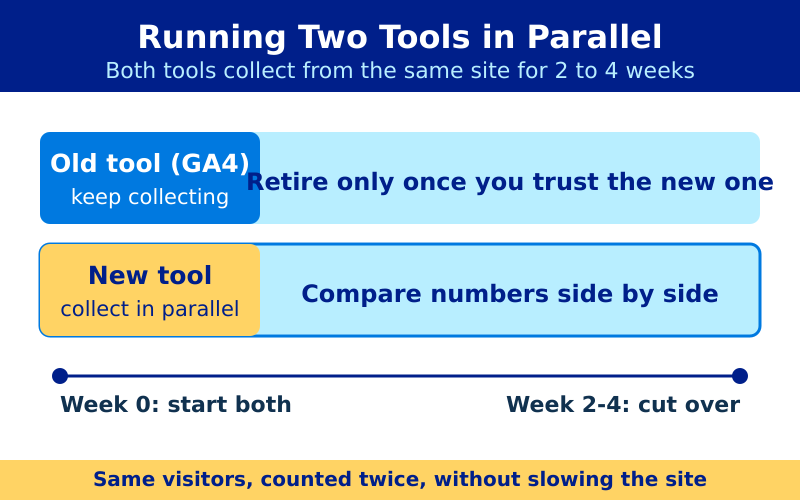
Parallel tracking — sometimes called dual-running — means both your old and new analytics tools collect data from the same site at the same time. For a defined window, usually two to four weeks, every visitor is counted twice: once by Google Analytics, once by your new privacy-first tool.
The goal isn’t to keep both forever. It’s to build a baseline. When the new tool reports 12,000 monthly visitors and the old one reports 18,000, you need to understand why before you trust either number. A parallel period gives you that side-by-side comparison.
Privacy-first tools almost always report lower numbers than GA4 — not because they’re wrong, but because they count differently. The parallel period is where you learn your site’s specific gap.
Why the Numbers Won’t Match (and That’s Fine)
New migrators panic when the two tools disagree. They shouldn’t. The tools measure different things by design. Here’s where the gaps come from:
| Source of Difference | Effect | Direction |
|---|---|---|
| Cookie consent gaps | GA4 misses visitors who decline cookies | GA4 lower |
| Ad blockers | Block GA4 more than first-party scripts | GA4 lower |
| Bot filtering | Different bot-exclusion rules | Varies |
| Session definition | GA4 resets sessions at midnight and on source change | GA4 higher session count |
| Sampling | GA4 samples high-traffic reports | GA4 less precise |
For instance, a site with an aggressive cookie banner might see GA4 undercount by 40% while a privacy-first tool captures everyone. On the other hand, GA4’s looser session rules can inflate session counts above what your new tool reports. Therefore, expect differences and document them rather than treating one tool as “correct.”
Step 1: Add the New Tool Alongside the Old
Install your new analytics script without removing the existing one. Most privacy-first tools — Plausible, Fathom, Umami — are a single line in the page head. They run independently of Google Analytics and won’t conflict.
If you use a tag manager, you can add the new tool there temporarily. That said, for the cleanest parallel test, load the new script directly in the page. This isolates it from any tag manager quirks you’ll be untangling later — a process covered in our tag manager migration guide.
Step 2: Watch Your Page Speed
Two analytics tools mean two scripts. For most privacy-first tools this is negligible — they weigh under 2 KB and load asynchronously. GA4’s script is heavier, around 50 KB before tag manager overhead.
Still, verify the impact. Run a before-and-after speed test on a key landing page. If load time climbs noticeably, prioritize ending the parallel period sooner. As a rule, the lightweight tool isn’t the problem — the GA4 stack is what you’re removing anyway.
Step 3: Compare the Right Metrics, Not All of Them
Don’t try to reconcile every number. Focus on the metrics your decisions depend on:
- Total visitors — establish your tool-to-tool ratio. This is your single most useful baseline.
- Top pages — the order should match even if absolute numbers differ.
- Top traffic sources — referrers and search should rank similarly.
- Key conversions — the metric that pays the bills must agree closely.
Specifically, calculate the ratio between the two visitor counts and write it down. If your new tool consistently shows 70% of GA4’s number, you can mentally translate historical GA4 reports going forward. That ratio is the most valuable thing the parallel period produces.
Step 4: Set a Clear End Date
Parallel tracking has a shelf life. Run it too short and you don’t trust the data. Run it too long and you’re paying a speed and complexity tax for no reason. Two to four weeks covers most sites — long enough to span a full traffic cycle, including a slow weekend and a busy weekday.
End the period when three conditions hold:
- The visitor ratio between tools is stable week over week.
- Top pages and sources rank the same in both tools.
- Your key conversion numbers agree within a margin you’re comfortable with.
Once those hold, remove Google Analytics and its tag manager footprint. Your new tool becomes the source of truth.
Step 5: Archive the Comparison
Before you switch off the old tool, export the parallel-period data from both. Screenshot the side-by-side ratios. This archive answers the inevitable question three months later: “Did our traffic drop, or do we just measure differently now?” With the comparison saved, you’ll know the answer in seconds.
This step pairs naturally with broader migration hygiene. See our analytics migration checklist for everything else worth archiving before the cutover.
When to Skip Parallel Tracking
Parallel tracking isn’t always worth it. Skip it when:
- Your site is brand new with little historical GA4 data to compare against.
- You’ve already migrated similar sites and know your tool-to-tool ratio.
- Traffic is low enough that a few weeks of data won’t reach significance.
In those cases, install the new tool, verify it fires correctly, and move on. For everything else — established sites with real reporting needs — the parallel period is cheap insurance against migrating blind.
Bottom Line
Run two analytics tools in parallel for two to four weeks. Expect the numbers to differ, and document why instead of panicking. Track the visitor ratio, confirm top pages and conversions agree, then set a firm end date. Archive the comparison before you switch off the old tool. Done this way, parallel tracking turns a nerve-wracking cutover into a measured handoff — and you’ll trust your new numbers from day one.