
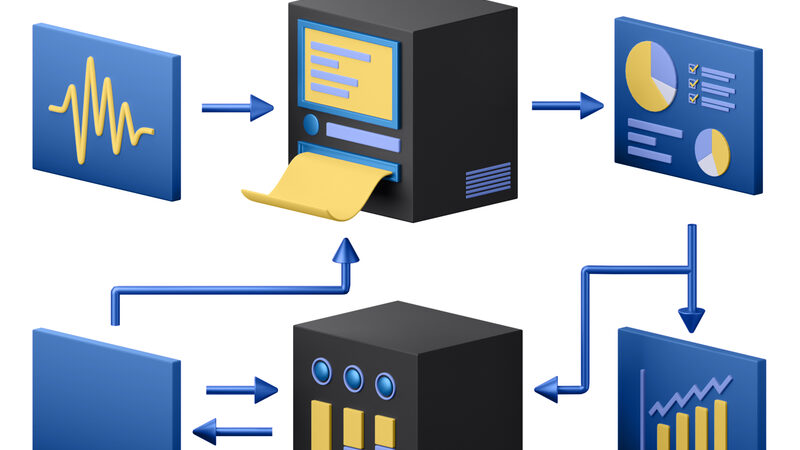
Server-side analytics moves data collection from the browser to your server. That single change eliminates ad blockers, cookie consent gaps, and most of the data loss that plagues traditional tracking. However, the term gets thrown around loosely. Here’s what server-side analytics actually means, when you need it, and how to set it up without overengineering.
What Is Server-Side Analytics?
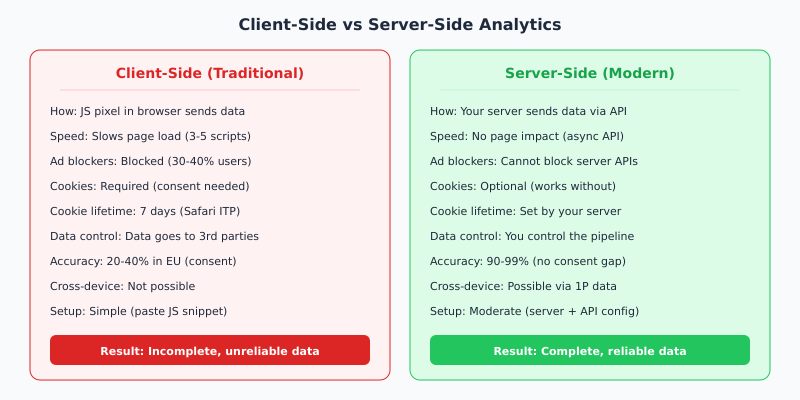
Traditional analytics works like this: a JavaScript snippet runs in your visitor’s browser, collects data (page views, clicks, events), and sends it to a third-party server like Google Analytics. Every step happens in the browser.
Server-side analytics flips this. Instead of the browser sending data directly to analytics platforms, your own server acts as the middleman. It collects events, processes them, and forwards the relevant data to wherever it needs to go — your analytics tool, ad platforms, or your own database.
Why does this matter? Because the browser is hostile territory for tracking. Ad blockers strip out JavaScript pixels. Safari’s Intelligent Tracking Prevention (ITP) limits cookie lifetime to 7 days. And GDPR cookie banners prevent 60-70% of European visitors from being tracked at all. Consequently, browser-based analytics gives you an incomplete and biased view of your traffic.
Server-side analytics bypasses all of these problems. As a result, you get more complete, more accurate data.
How Server-Side Tracking Works in Practice
The architecture varies depending on your setup, but the core flow is the same:
- A visitor loads your page. A lightweight first-party script (or no script at all, depending on your tool) sends basic event data to your server.
- Your server receives the request. Because it’s a first-party request to your own domain, ad blockers don’t touch it.
- Your server processes the event. It enriches the data (adds session info, strips PII if needed) and decides where to forward it.
- Your server sends data to analytics platforms via their server-to-server APIs — GA4’s Measurement Protocol, Meta’s Conversions API, or any other endpoint.
The key difference: the browser never talks directly to Google, Meta, or any third party. Your server controls the entire data pipeline.
When Do You Actually Need Server-Side Analytics?
Not every website needs a server-side setup. Here’s a practical decision framework:
| Situation | Do You Need Server-Side? | Why |
|---|---|---|
| Blog or content site in EU | No — use Plausible or Fathom | Privacy-first tools already track without cookies |
| E-commerce with paid ads | Yes | Ad platform APIs need server events for attribution |
| SaaS with long sales cycles | Yes | Cross-device and multi-session tracking requires it |
| Small business, no ads | No — overkill | Cookieless analytics tools cover your needs |
| Enterprise with strict compliance | Yes | Full data control and audit trail |
In other words, server-side tracking is essential if you run paid advertising or need precise conversion attribution. For content sites and blogs, switching to a privacy-first analytics tool is simpler and achieves the same result.

3 Implementation Options Compared
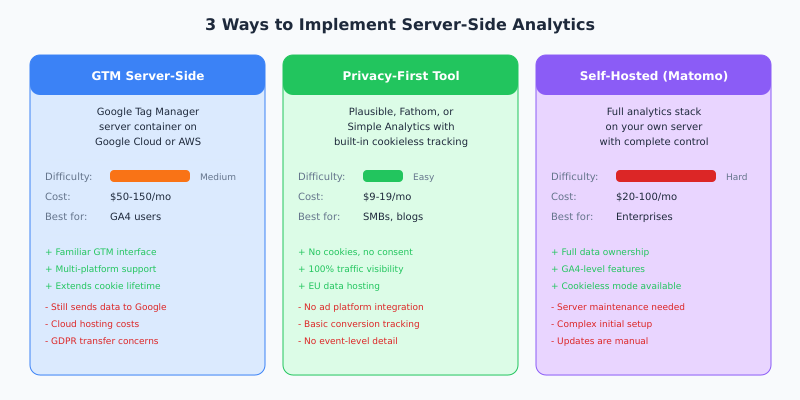
There are three main paths to server-side analytics. Each trades off simplicity, cost, and control differently.
Option 1: Google Tag Manager Server-Side
GTM Server-Side deploys a server container (typically on Google Cloud) that receives events from your website’s GTM and forwards them to GA4, Google Ads, Meta, and other platforms.
The setup process:
- Create a server container in GTM
- Deploy it on Google Cloud Run or App Engine ($50-150/month)
- Point your web GTM container to send events to your server endpoint
- Configure server-side tags for each destination (GA4, Google Ads, Meta CAPI)
However, there’s a catch for EU businesses. Your data still flows through Google infrastructure, which means the same GDPR data transfer concerns apply. For more on this, see our Google Analytics and GDPR guide.
Option 2: Privacy-First Analytics (Simplest)
Tools like Plausible, Fathom, and Simple Analytics handle server-side collection out of the box. You add one script tag, and the tool does everything — no server configuration, no cloud containers, no APIs to manage.
These tools don’t use cookies, so they don’t need consent banners. As a result, you see 100% of your traffic. The trade-off is limited ad platform integration — they’re designed for website analytics, not conversion attribution for paid campaigns.
For most small and medium businesses that don’t run heavy ad campaigns, this is the right choice. Our migration checklist covers the switch process.
Option 3: Self-Hosted (Matomo)
Matomo gives you GA4-level features on your own server. You get full data ownership, GDPR compliance by default (data never leaves your infrastructure), and a cookieless tracking mode.
The cost is complexity. You need to provision a server, install and configure Matomo, manage updates, and handle scaling. For organizations with dedicated DevOps, this is manageable. For small teams, it’s usually overkill.
Server-Side Tracking and GDPR
Server-side tracking doesn’t automatically make you GDPR compliant. It gives you control over compliance.
Specifically, server-side architecture lets you:
- Strip PII before forwarding data — Remove IP addresses, user agents, or other identifiers before sending events to third parties
- Choose where data is stored — Keep everything on EU servers if needed
- Set first-party cookies from your domain — Extending cookie lifetime beyond Safari’s 7-day ITP limit
- Audit the data flow — See exactly what’s being sent where
That said, if you’re forwarding data to Google or Meta’s servers, the data transfer concerns remain. The server-side container is just a relay — it doesn’t change where the data ultimately ends up. For a complete overview of GDPR requirements, read our GDPR-compliant analytics guide.
Setup Guide: GTM Server-Side (Step by Step)
If you’re already using Google Tag Manager and want to add server-side tracking, here’s the process:
Step 1: Create a Server Container
In GTM, click Admin → Create Container and select Server as the target platform. Choose your hosting — Stape.io is the simplest managed option ($50/month), or deploy on Google Cloud yourself.
Step 2: Configure Your Web Container
Update your existing web GTM container to send events to your server endpoint instead of directly to GA4. Change the transport URL in your GA4 tag to point to your server container’s domain.
Step 3: Set Up Server-Side Tags
In the server container, create tags for each destination:
- GA4 tag — Forwards events to Google Analytics
- Google Ads conversion tag — Sends Enhanced Conversions data
- Meta CAPI tag — Forwards purchase and lead events to Meta
Step 4: Add a Custom Domain
Point a subdomain (like track.yoursite.com) to your server container. This makes all tracking requests first-party, which prevents ad blockers from interfering and extends cookie lifetime.
Step 5: Test and Validate
Use GTM’s preview mode and your ad platform’s event testing tools to verify events are flowing correctly. Compare data volumes between client-side and server-side for 2-4 weeks before switching fully.
For a broader view of your options when moving away from traditional analytics, see whether you actually need a cookie banner.
Bottom Line
Server-side analytics solves the biggest problem in modern tracking: data loss. By moving collection from the browser to your server, you eliminate ad blockers, cookie consent gaps, and browser privacy restrictions. Furthermore, you gain control over your data pipeline — deciding what gets sent where.
For content sites, privacy-first analytics tools are the simpler path. For e-commerce and SaaS businesses running paid campaigns, server-side tracking through GTM or a managed platform like Stape is worth the investment. Either way, the era of relying on browser-based JavaScript pixels for accurate data is over.