

Every marketing team faces the same challenge: figuring out which campaigns actually drive results. However, traditional tracking methods rely heavily on third-party cookies — a mechanism that’s disappearing fast. UTM parameters offer a reliable, privacy-friendly alternative that works regardless of cookie policies or browser restrictions.
This UTM tracking guide walks you through the five standard parameters, shows you how to build trackable URLs, and explains why UTMs are essential in a cookieless analytics world.
What Are UTM Parameters and Why Do They Matter?
UTM (Urchin Tracking Module) parameters are tags appended to URLs that tell your analytics platform where traffic originates. They were originally developed for Urchin, the software Google acquired and turned into Google Analytics. Consequently, they’ve become the universal standard for campaign attribution across every analytics tool.
Here’s why they’re especially relevant today: UTM parameters don’t depend on cookies, JavaScript, or browser storage. They’re embedded directly in the URL. Therefore, they work perfectly with privacy-first analytics platforms like Plausible, Fathom, and Simple Analytics.
A UTM-tagged URL looks like this:
https://example.com/pricing?utm_source=newsletter&utm_medium=email&utm_campaign=spring_launchWhen someone clicks that link, your analytics tool captures those parameters and attributes the visit to the correct campaign. In other words, you get clear attribution without any tracking cookies.
The 5 UTM Parameters: A Complete Breakdown
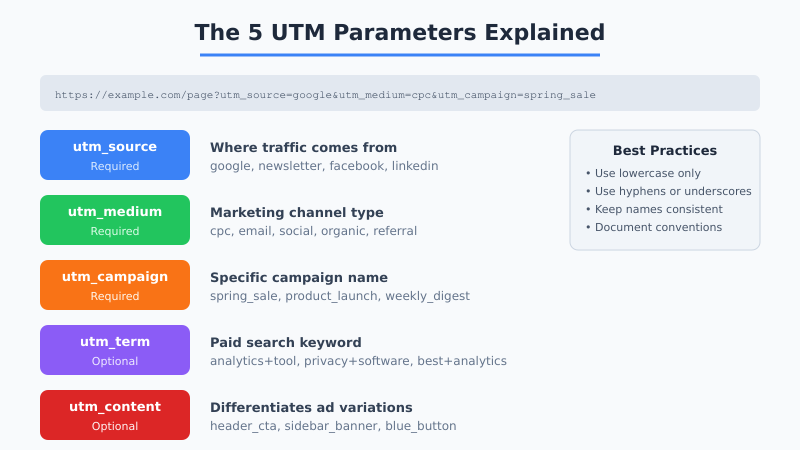
There are five standard UTM parameters. Three are required for proper tracking, and two are optional but useful for granular analysis.
Required Parameters
| Parameter | Purpose | Example Values |
|---|---|---|
utm_source |
Identifies the traffic source | google, newsletter, linkedin, twitter |
utm_medium |
Defines the marketing channel | cpc, email, social, referral, organic |
utm_campaign |
Names the specific campaign | spring_sale, product_launch, weekly_digest |
Optional Parameters
| Parameter | Purpose | Best Use Case |
|---|---|---|
utm_term |
Tracks paid search keywords | PPC campaigns where you bid on specific terms |
utm_content |
Differentiates ad variations | A/B testing different CTAs or ad creatives |
Moreover, keeping all five parameters consistent across your organization prevents data fragmentation. A single misspelling — “Email” vs. “email” — creates separate line items in your reports.
How to Build UTM-Tagged URLs
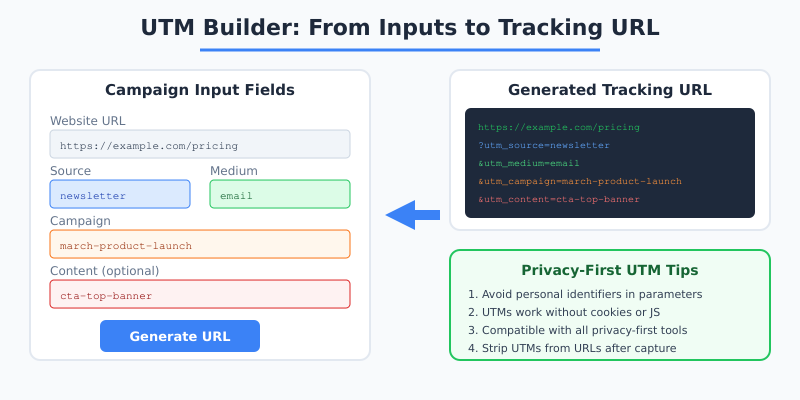
You can build UTM URLs manually, but that’s error-prone. Instead, use a UTM builder tool or create a shared spreadsheet template. Google’s Campaign URL Builder is the most popular free option, though several privacy-first alternatives exist.
Step-by-Step Process
- Start with the destination URL — the page you want to track visits to.
- Add utm_source — where will you place this link? Newsletter, social post, partner site?
- Add utm_medium — what type of channel is it? Email, CPC, social, display?
- Add utm_campaign — give the campaign a descriptive, consistent name.
- Add optional parameters — use utm_content for A/B variants and utm_term for keywords.
- Shorten the URL — long UTM strings look messy in social posts. Use a link shortener.
Furthermore, document every campaign URL in a shared spreadsheet. This prevents duplicate naming and makes it easy to audit your tracking setup later.
UTM Naming Conventions That Scale
The biggest mistake teams make with UTM tracking isn’t forgetting parameters — it’s inconsistent naming. Here are rules that prevent data chaos:
- Always use lowercase. Most analytics tools treat “Email” and “email” as different sources.
- Use hyphens or underscores consistently. Pick one separator and stick with it (e.g.,
spring-saleorspring_sale). - Avoid spaces. They become
%20in URLs and create readability issues in reports. - Be specific but concise. Use
2026-q1-product-launchinstead of justlaunch. - Never include personal data. Email addresses, user IDs, or names in UTM parameters violate privacy regulations.

Additionally, create a naming convention document that every team member can reference. This is particularly important when multiple departments run campaigns simultaneously.
UTM Parameters in Privacy-First Analytics
Traditional analytics platforms like Google Analytics use UTM data alongside cookie-based user tracking. Privacy-first platforms handle UTMs differently — and in many ways, better.
Here’s how popular privacy-first tools process UTM parameters:
| Feature | Google Analytics 4 | Plausible | Fathom | Simple Analytics |
|---|---|---|---|---|
| UTM support | Full | Full | Full | Full |
| Requires cookies | Yes | No | No | No |
| Campaign dashboard | Complex | Simple | Simple | Simple |
| Real-time UTM data | Delayed | Instant | Instant | Instant |
| GDPR-compliant by default | No | Yes | Yes | Yes |
Therefore, UTM parameters actually become more important when you switch to privacy-first analytics. Without cookies to identify returning visitors, UTMs are your primary method for campaign attribution. For a deeper look at what changes during a migration, see our guide on what you lose and gain when leaving Google Analytics.
Tracking Campaigns Across Channels Without Cookies
Cookieless campaign tracking requires a deliberate strategy. However, UTM parameters make it entirely feasible. Here’s how to structure attribution for each major channel:
Email Marketing
Tag every link in your newsletters and automated sequences. Use utm_source for the list or segment name, utm_medium=email, and utm_campaign for the specific send.
?utm_source=weekly_newsletter&utm_medium=email&utm_campaign=2026-03-feature-update&utm_content=header_ctaSocial Media
Each platform gets its own source tag. Use utm_content to distinguish between organic posts and promoted content.
?utm_source=linkedin&utm_medium=social&utm_campaign=thought_leadership&utm_content=organic_postPaid Search
Combine UTMs with utm_term to track which keywords drive conversions. This is especially valuable because cookieless conversion tracking limits what you can capture automatically.
Partner and Affiliate Links
Give each partner a unique utm_source value so you can measure referral performance without relying on cookie-based affiliate tracking pixels.
Common UTM Tracking Mistakes to Avoid
Even experienced marketers make UTM errors. Here are the most frequent problems and how to fix them:
- Inconsistent capitalization. “Facebook” vs. “facebook” splits your data. Consequently, always enforce lowercase in your naming convention.
- Tagging internal links. UTM parameters should only go on links from external sources. Adding them to internal navigation overwrites the original source attribution.
- Forgetting to tag all links. If half your newsletter links have UTMs and half don’t, you’ll see inflated “direct” traffic.
- Using vague campaign names. Names like “test” or “campaign1” are useless three months later. Be descriptive.
- Including personal data. Never put email addresses, user IDs, or names in UTM parameters. This violates GDPR compliance requirements and other privacy regulations.
Building a UTM Tracking Spreadsheet
A centralized tracking document prevents most UTM mistakes. Your spreadsheet should include these columns:
| Column | Example | Notes |
|---|---|---|
| Date | 2026-03-23 | When the link was created |
| Destination URL | https://site.com/pricing | The landing page |
| Source | newsletter | Lowercase, no spaces |
| Medium | Standard channel name | |
| Campaign | 2026-q1-pricing-promo | Descriptive and dated |
| Content | hero-button | Optional: for A/B tests |
| Full URL | Auto-generated formula | Concatenates all fields |
| Owner | Marketing team | Who created the link |
Moreover, this spreadsheet serves as an audit trail. When campaign performance looks off, you can quickly verify that UTM tags were applied correctly.
Analyzing UTM Data in Your Analytics Dashboard
Once your UTM-tagged links are live, here’s how to extract insights from the data:
- Source/Medium report: Shows which channel combinations drive the most traffic and conversions.
- Campaign comparison: Reveals which specific campaigns outperform others.
- Content analysis: When using utm_content, you can compare CTA button performance, ad creative variations, or email layout tests.
- Landing page attribution: Combine UTM data with page-level analytics to see which campaigns drive traffic to which pages.
In privacy-first tools, these reports are typically simpler and more accessible than in GA4. For instance, Plausible shows UTM data directly on the main dashboard under “Sources.” Fathom provides a dedicated campaign report. In other words, you spend less time configuring and more time analyzing.
If you’re planning to migrate your analytics setup, review our analytics migration checklist to ensure your UTM tracking survives the transition.
Advanced UTM Strategies for 2026
Beyond the basics, several advanced techniques can improve your campaign attribution:
- Dynamic UTM insertion: Use email marketing tools that automatically populate UTM parameters based on subscriber segments.
- Server-side UTM capture: Strip UTM parameters from URLs after capturing them server-side to keep URLs clean for sharing. Learn more about server-side analytics implementation.
- UTM + event tracking: Combine UTM attribution with event tracking to measure not just visits but specific actions per campaign.
- Cross-domain UTM persistence: When users navigate between your marketing site and app, pass UTM parameters through to maintain attribution.
Consequently, UTM parameters remain the most reliable, privacy-compliant method for campaign tracking in 2026. They require no cookies, work across all platforms, and give you clear attribution data. Start with a consistent naming convention, build a shared tracking spreadsheet, and ensure every external link includes proper UTM tags. Your analytics data will be cleaner and your campaign decisions sharper.